At United Security, reliability matters. DSX Access Systems, Inc. provides full enterprise grade access control systems. DSX hardware and software are built right here in the USA. As factory authorized dealers, we know there is no other system that can match the feature set, functionality, ease of use, and of course, reliability of DSX.
Some features of DSX Access Systems:
– Multisite. Multiple sites managed from one server. Locations all over the planet can be managed from one site. Fully scalable. Start with one door today, add 100 tomorrow.
– Licensing. No pay walls or recurring licenses. With WinDSX, DSX Access Control Software, there are no recurring licensing or other fees. Once you’ve purchased a software license, it is yours. Custom software functions are included in the DSX Software package. No fees for adding doors, locations, or card holders in the future.
–Custom Programming. United Security includes all custom programming with each install. Your system will be programmed for you. You won’t pay extra for features like lockdown, first man in, two man rule, man traps, door interlock, etc. These software features are included with your WinDSX license and can be customized to fit your facility and needs.
–Secure. AES Encryption between server and panel, panel and panel, and client workstations and server. DSX systems do not require an internet connection. Air gap your server for the ultimate in security, or VLAN your server and panels to limit access within your network.
–Audit Trail. Everything that happens within DSX is written to a log file. Reports are available for all history and database information. Reports are fully customizable to show only the data you need. Reports can be saved for later use, and set up to run automatically and emailed.
–Server flexibility. Install on physical servers, virtual machines, AWS and Google Cloud servers. Small systems will run reliably on a Windows 10 desktop.
–Local support. United Security is available 24/7. Training is always included with new installations. Telephone support is available at no charge. Need help setting up that history report? Call us. Need to change a time zone or access level? Call us. We’ll walk you through the software step by step, all at no charge.
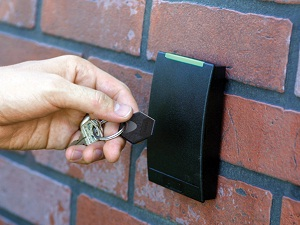
-What can you do with it? Access control can be installed on doors, roll up doors, sliding doors, gates, drawers, filing cabinets, key boxes, safes, vaults, you name it. If it opens, we can probably put access control on it!
With HID Mobile Access, your mobile device can take the place of your access control card or fob. Android and Apple Phones, tablets, Apple Watches are all compatible. Manage and order mobile credentials and distribute them directly to your end users email. All from your PC.
Badge Printing:
With WinDSX, Badge printing is built in to the access control software. Add a badge printer and you’re all set. Make a separate badge template for each department, customize badges with company logos, card holder pictures, etc. We will be there to help get your badging setup and running.
Third Party Integrations. Elevators, video and audio intercoms, alarm systems, video systems, lighting, and more can be integrated with DSX.
Call our design team today and let’s see what we can build for you.